Imagine you’re a product manager tasked with launching a new mobile app. You have a vision, but translating that vision into a clear, compelling plan for your team and stakeholders is a challenge. Enter the Five Aspects Infographic Designer, an AI-powered tool from Visual Paradigm that transforms complex strategic frameworks into instantly shareable, professional visuals. This tool doesn’t just help you visualize your ideas; it helps you communicate them with clarity and impact. In this guide, we’ll walk through the process of using this powerful software to create a professional infographic for a “Launching a new mobile app” project, using the SMART Goals framework as an example. We’ll explore how to input your topic, select the right analysis type, generate content with AI, customize the layout, and share your insights seamlessly.
Key Takeaways
-
Use the Five Aspects Infographic Designer to quickly create professional visuals for strategic frameworks like SMART Goals.
-
Input your topic and select a predefined analysis type (e.g., SMART Goals) to generate content with AI.
-
Customize your infographic with various layouts, animations, and inline editing for a polished final product.
-
Save your work to the cloud and share it via a simple, read-only URL for easy collaboration.
Step 1: Define Your Topic and Analysis Type
The journey begins on the landing screen of the Five Aspects Infographic Designer. As seen in
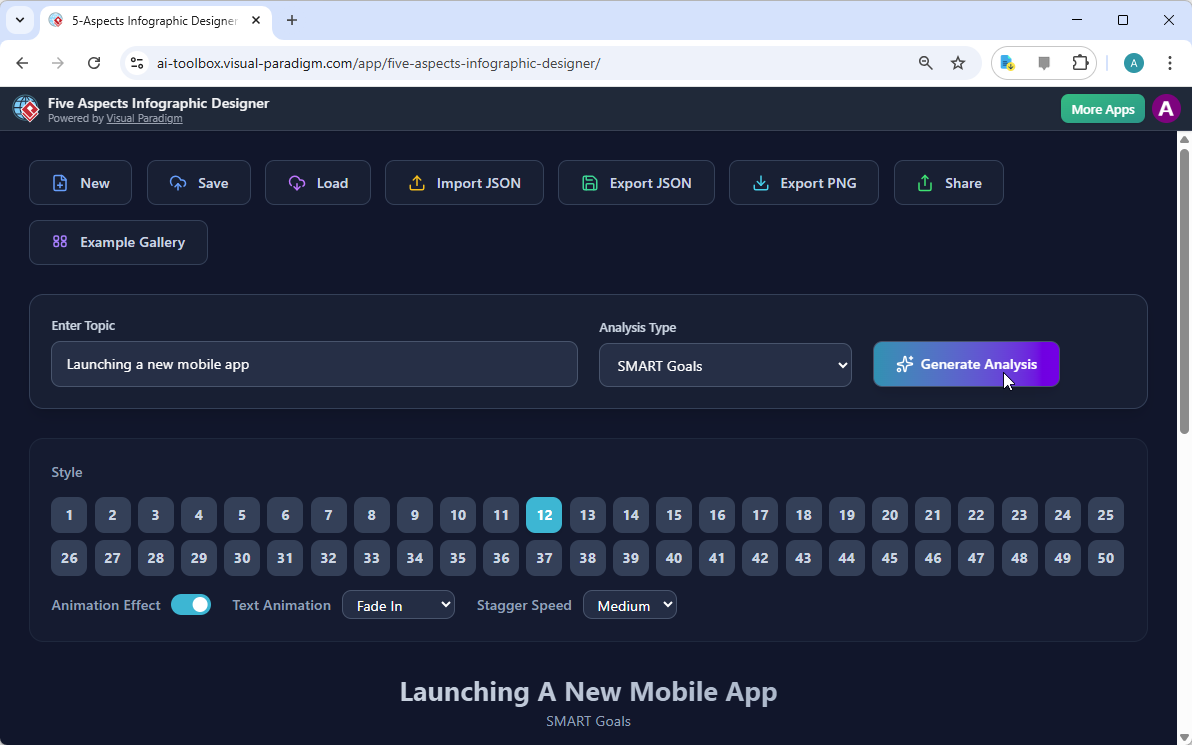
, the interface is clean and intuitive, designed for immediate action. Your first task is to enter a brief description of your project or problem in the “Enter Topic” field. In our example, we’ve entered “Launching a new mobile app.” This is the seed from which the AI will grow your entire infographic. The next crucial step is selecting the “Analysis Type” from the dropdown menu. The tool offers a library of predefined frameworks, and for this project, we’ve chosen “SMART Goals,” a perfect fit for breaking down a launch plan into Specific, Measurable, Achievable, Relevant, and Time-bound components. This choice ensures your analysis is structured and comprehensive. With both inputs complete, you’re ready to let the AI do its magic. Click the prominent “Generate Analysis” button, and the tool will analyze your topic and analysis type to populate the five aspects of your infographic with relevant content.
Step 2: Generate and Customize Your Infographic
After clicking “Generate Analysis,” the tool instantly transforms your inputs into a fully formed, visually appealing infographic.
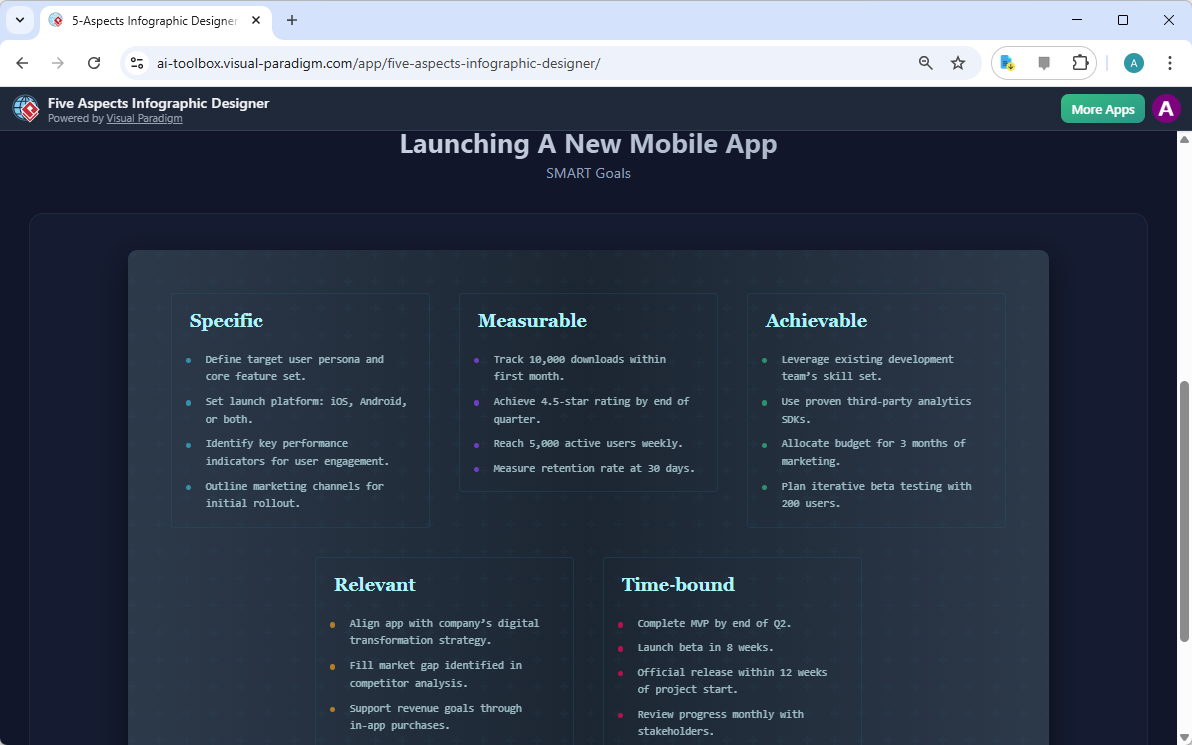
shows the result: a beautifully structured layout with the five SMART Goals aspects—Specific, Measurable, Achievable, Relevant, and Time-bound—each with detailed bullet points. This AI-generated content serves as a powerful starting point, providing a comprehensive and insightful analysis that you can refine. The tool offers extensive customization options to make your infographic uniquely yours. You can browse through 50 different visual styles, selecting the one that best suits your presentation. The “Style” section allows you to pick a layout, while the “Animation Effect” toggle lets you add dynamic text animations like “Fade In” to make your points pop. You can also adjust the “Stagger Speed” to control how quickly the text appears. For fine-tuning, you can click directly into any text field to edit the AI-generated content, ensuring your final infographic reflects your specific expertise and insights.
Step 3: Share and Present Your Insights
Once your infographic is polished to perfection, the final step is sharing it with your team, clients, or stakeholders. The Five Aspects Infographic Designer makes this effortless. After saving your project to the cloud, you can click the “Share” button, which opens the “Share Infographic” modal shown in
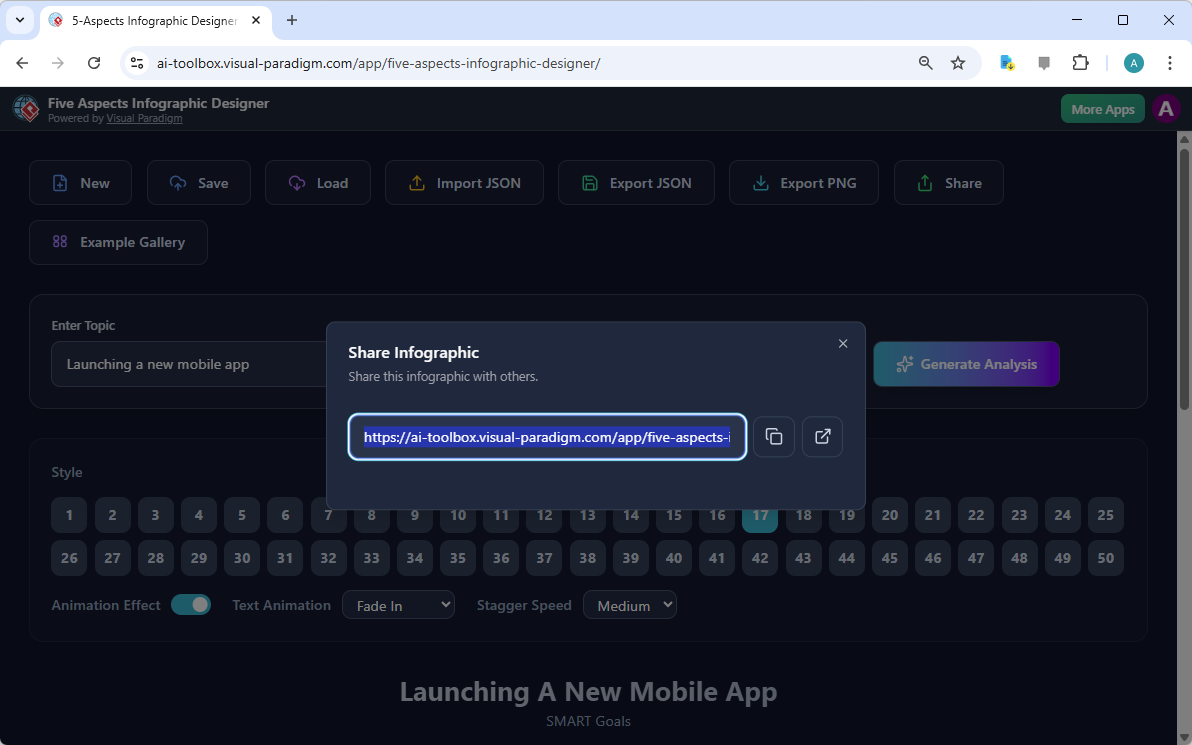
. This modal provides a unique, read-only URL for your infographic. This is a game-changer for collaboration, as it allows you to share your professional insights without the risk of accidental edits. The recipient can simply open the link to view your infographic in a clean, interactive “viewer mode,” ensuring your message is delivered clearly and professionally. Whether you’re presenting at a meeting, sending a report, or simply sharing a quick update, this streamlined sharing process ensures your visual analysis is accessible and impactful.
Conclusion
The Five Aspects Infographic Designer from Visual Paradigm is more than just a tool; it’s a strategic advantage for anyone who needs to communicate complex ideas clearly. By automating the content generation process with AI, it frees up your time to focus on the interpretation and application of your analysis, rather than the tedious work of designing a visual. From the initial input of a topic to the final act of sharing a polished, animated infographic, the entire workflow is designed for speed and simplicity. Whether you’re a business strategist, a product manager, or a consultant, this AI-powered software empowers you to visualize your frameworks with professional results in minutes. It’s a powerful solution for turning strategic thinking into compelling, shareable visuals.
Ready to transform your strategic planning process? Try the Five Aspects Infographic Designer today at https://ai-toolbox.visual-paradigm.com/app/five-aspects-infographic-designer/.
Related Links
-
Write SMART Goals & INVEST for User Stories: SMART is a set of criteria for … objective) to lead them in the direction of what they want to accomplish. SMART stands for Specific, Measurable, Achievable, Relevant and Time-bound ….
-
Saving SMART Goal Strategic Analysis – Visual Paradigm: Here is a SMART Goal template created with Visual Paradigm ‘s online strategic analysis tool. You can customize this template by modifying the text, color and font, and use it in your presentations and reports.
-
Free Mind Map Template: SMART Goals to Improve Customer …: Visual Paradigm Smart Board empowers users to seamlessly create and manage SMART Goals , providing a professional and convenient platform for goal setting. With its intuitive interface and collaborative features, teams can efficiently outline Specific, Measurable, Achievable, Relevant, and Time-Bound objectives.
-
Free Mind Map Template: SMART goals: These templates guide users through defining Specific, Measurable, Achievable, Relevant, and Time-Bound elements , ensuring a comprehensive and strategic approach to goal planning. Users can easily input their goals, breaking them down into actionable steps, setting measurable metrics, and …
-
Champion SMART Goal Strategic Analysis | Strategic Analysis Template: we always have the goals we want to accomplish, but the approaches to achieve them are not always clear. You may encounter this situation: many times we find that we do things by halves.
-
Free Mind Map Template: SMART Goals to Save Money for a House: This mind map outlines a SMART goal focused on saving money for a house . The specific, measurable, achievable, relevant, and time-bound components are systematically addressed. The insight here is the detailed planning and strategic approach toward achieving a financial milestone.
-
Free Mind Map Template: SMART Goals to Lower Customer Churn Rate to 20%: Begin by defining Specific, Measurable, Achievable, Relevant, and Time-Bound objectives . With Smart Board’s intuitive interface, you can easily outline the specifics, establish measurable criteria, ensure achievability, relevance to overarching goals, and set a realistic time frame.