
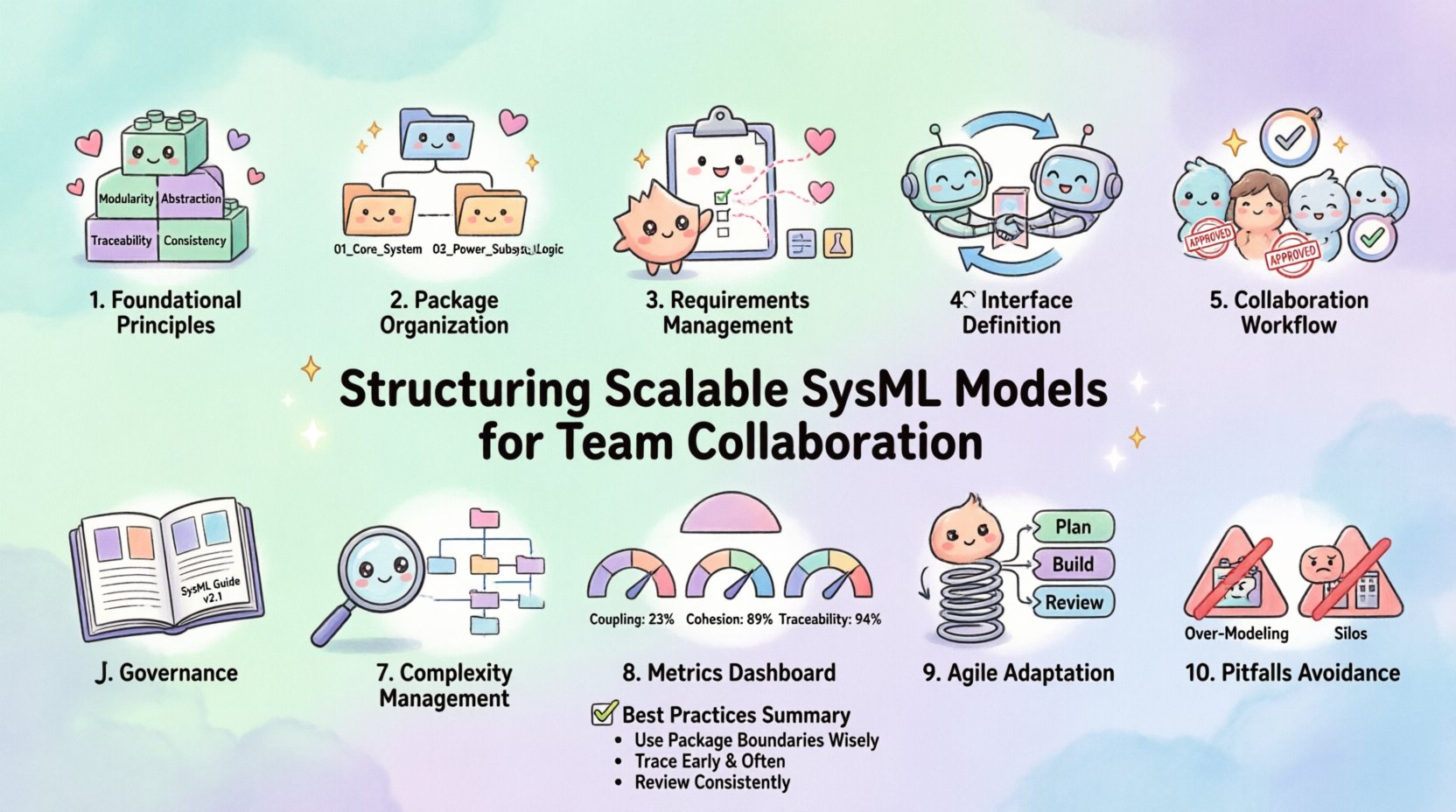
In the complex landscape of modern systems engineering, the integrity of a model dictates the success of the project. SysML, the Systems Modeling Language, provides a standardized framework for specifying, analyzing, designing, and verifying complex systems. However, the mere existence of a model does not guarantee its utility. The true value emerges when that model is structured to support scalability and seamless collaboration across distributed teams. A poorly organized model becomes a bottleneck, obscuring requirements and delaying development cycles. Conversely, a well-architected model serves as a single source of truth, enabling parallel workstreams and reducing integration friction.
This guide outlines the essential strategies for structuring SysML models to handle growth, maintain clarity, and facilitate effective teamwork. We focus on architectural patterns, management practices, and governance standards that ensure the model remains a robust asset throughout the system lifecycle.
Foundational Principles of Model Architecture 🧱
Before diving into specific packages or diagrams, it is necessary to establish the core principles that guide the structure of a scalable model. These principles act as the rules of engagement for all contributors. Without them, the model will inevitably drift into chaos as the number of engineers and the complexity of the system increase.
Modularity: The model must be decomposed into manageable, independent units. This allows different teams to work on distinct subsystems without constant conflict over shared elements.
Abstraction: High-level views should separate concerns from low-level details. This prevents information overload and allows stakeholders to focus on the level of detail relevant to their role.
Traceability: Every element should be linked to a parent or consumer. This ensures that changes in requirements propagate correctly to design and verification artifacts.
Consistency: Naming conventions, styling, and structural patterns must be uniform. Consistency reduces cognitive load when navigating the model.
When teams adopt these principles early, they create a foundation that supports iteration and growth. The goal is to build a structure that feels intuitive to a new team member joining the project.
Organizing Packages and Subsystems 📂
The physical organization of model elements is the first line of defense against complexity. In SysML, packages serve as containers for diagrams, blocks, and requirements. How these packages are nested defines the hierarchy of the system. A flat structure is rarely scalable; deep nesting without logic is equally problematic. The recommended approach involves a hybrid hierarchy that mirrors the system breakdown structure.
The System Hierarchy
Organize packages to reflect the physical and logical decomposition of the system. This approach aligns the model structure with the engineering reality.
Root Package: Contains the project-level metadata, overall requirements, and the top-level block definition.
Subsystems: Each major subsystem (e.g., Power, Propulsion, Avionics) should have its own dedicated package. This isolates changes within the subsystem from the rest of the model.
Interfaces: Interface blocks should be placed in a shared location if they are used across multiple subsystems. This promotes reuse and ensures that connection points remain consistent.
Internal Logic: Detailed behavior diagrams and internal block definitions reside within the specific subsystem package to keep the root clean.
Package Naming Conventions
Ambiguity in package names leads to errors. A strict naming convention prevents confusion. Use a hierarchical format that indicates the scope and function.
Prefixes: Use prefixes to denote type, such as
REQ_for requirements,BLK_for blocks, andIFC_for interfaces.Versioning: Include version identifiers in package names if the project spans multiple release cycles. This helps in archiving and comparing model states.
Readability: Avoid underscores or special characters that might cause issues with external tools or file systems. Use camelCase or clear separators.
Package Name | Description | Recommended Use |
|---|---|---|
| Top-level system definition | Overall architecture and high-level requirements |
| Power generation and distribution | Electrical blocks, energy flows, and power requirements |
| Software control logic | State machines, activity diagrams, and logic constraints |
| Reusable model elements | Standard interfaces, common blocks, and reference diagrams |
Managing Requirements and Traceability 📋
Requirements are the driving force behind system design. In a collaborative environment, the management of requirements is critical. A scalable model ensures that requirements are not scattered but are centralized and linked logically. This enables impact analysis when a stakeholder requests a change.
Requirement Classification
Categorize requirements to manage scope and ownership effectively. Use a tagging system or specific packages to distinguish between types.
Functional Requirements: Define what the system must do. These link directly to use cases and internal blocks.
Performance Requirements: Define constraints such as speed, weight, or latency. These often link to interface specifications.
Verification Requirements: Define how success is measured. These should link to test cases and analysis diagrams.
Constraints: Define external limitations like regulatory standards or environmental conditions.
Traceability Chains
Traceability is the ability to follow the relationship between elements. A robust model maintains bidirectional links. If a requirement changes, the model should allow you to see which design elements are affected. If a design element changes, you should see which requirements are at risk.
Ensure that every requirement has at least one design element assigned to it. This prevents “orphaned requirements” that have no implementation path. Conversely, every design element should satisfy at least one requirement. This prevents over-engineering and ensures every piece of code or hardware serves a defined purpose.
Use the Requirement Diagram to visualize these links. Keep these diagrams high-level. Do not clutter the model with detailed traceability matrices in the diagram view; rely on the data relationships instead. This keeps the visual models clean for review.
Interface Definition and Exchange 🔄
Collaboration often breaks down at the boundaries between subsystems. Interfaces are the contract between teams. A clear interface definition allows the Power team to design the battery without needing to know the internal details of the Control team, provided the interface parameters are agreed upon.
Interface Blocks and Connections
Define interfaces using Interface Blocks. These should be placed in a shared package accessible to all relevant teams. This ensures that if Team A updates an interface parameter, Team B sees the change immediately.
Standardized Properties: Define properties (data types, units, ranges) clearly. Avoid ambiguous terms like “high” or “low” without numerical bounds.
Flow Connections: Use Flow Connections to define the physical or data transfer. This clarifies direction and type of information.
Change Management: Treat interface blocks as controlled documents. Any change to an interface block should trigger a review workflow.
Viewpoints and Diagrams
Not every team needs to see every diagram. Use viewpoints to filter the model content. A viewpoint is a set of rules that determines which elements are visible in a specific view.
System View: For management and high-level architecture. Focus on top-level blocks and major requirements.
Design View: For engineers. Focus on internal block structures, state machines, and detailed requirements.
Analysis View: For performance and verification teams. Focus on parameters, constraints, and test cases.
By configuring viewpoints, you reduce the cognitive load on users. They see only what is relevant to their specific task, reducing the risk of accidental modification of unrelated elements.
Collaboration Workflows and Access Control 🤝
Even the best model structure fails if the workflow does not support collaboration. Teams need clear processes for checking out, editing, and checking in model elements. Version control is essential to prevent conflicts and allow for rollback if a change introduces errors.
Check-In / Check-Out Mechanisms
Implement a locking mechanism for critical model elements. This prevents two engineers from editing the same block definition simultaneously. While this can slow down speed, it ensures data integrity in complex systems.
Exclusive Locks: Use for core architectural blocks that define system behavior.
Shared Access: Allow read-only access for most team members to view progress without risk of conflict.
Conflict Resolution: Establish a protocol for resolving conflicts when a lock is released and changes are merged.
Review and Approval Processes
Before a model element becomes part of the baseline, it must undergo review. This adds a layer of quality assurance.
Peer Review: Design elements should be reviewed by a peer engineer to catch logical errors.
Stakeholder Sign-off: Requirements and high-level designs require approval from the customer or project manager.
Automated Checks: Use validation rules to check for missing links, broken flows, or naming violations automatically.
Workflow Stage | Activity | Responsible Role |
|---|---|---|
Creation | Define new block or requirement | System Engineer |
Validation | Check for syntax and traceability errors | Model Manager |
Review | Technical assessment of logic | Senior Engineer |
Baseline | Freeze element for development | Project Lead |
Governance and Standards 📜
Standards provide the guardrails that keep the model from becoming a wild west. Governance involves defining the rules and ensuring they are followed. This is not about bureaucracy; it is about maintaining quality over the long term.
Documentation Standards
Every package and significant block should have associated documentation. This documentation explains the intent, not just the syntax.
Purpose: Why does this block exist?
Assumptions: What conditions are assumed to be true?
Dependencies: What external systems does this rely on?
Include this information in the properties section of the model element or in a dedicated text note within the package. This ensures that when a team member joins a year later, they understand the context.
Naming and Styling Rules
A uniform appearance helps in scanning the model quickly. Define a style guide for the model.
Fonts: Standardize font sizes for blocks, requirements, and notes.
Colors: Use color coding to indicate status (e.g., Green for Baseline, Yellow for Draft, Red for Issue).
Labels: Define standard label formats for diagrams to ensure consistency across all views.
Handling Complexity and Views 🎨
As the system grows, diagrams become cluttered. A single diagram containing 50 blocks is difficult to read and edit. Managing complexity requires the strategic use of views and diagrams.
Diagram Decomposition
Break large diagrams into smaller, focused diagrams. A block definition diagram should show the hierarchy, not the internal behavior. Internal block diagrams should show connections, but not every possible state transition. Use inheritance and composition to keep diagrams clean.
Focus on One Concern: A diagram should primarily address one aspect of the system, such as structure, behavior, or requirements.
Use Reference Blocks: Instead of duplicating a complex block structure in multiple diagrams, reference the block definition. This keeps the model DRY (Don’t Repeat Yourself).
Highlighting: Use highlighting to emphasize specific flows or paths within a complex diagram without altering the underlying model.
Model Validation
Regularly run validation checks on the model. This ensures that the model remains consistent as it evolves.
Syntax Checks: Ensure all syntax rules of the language are followed.
Logic Checks: Ensure there are no circular dependencies in requirements or design.
Completeness Checks: Ensure all requirements have design coverage.
Metrics and Validation 📊
To ensure the model remains scalable, measure its health. Metrics provide objective data on the state of the model.
Key Performance Indicators
Coupling: Measure how many elements depend on a specific block. High coupling indicates a risk point for changes.
Cohesion: Measure how related the elements within a package are. High cohesion indicates a well-organized subsystem.
Traceability Coverage: The percentage of requirements linked to design elements. Aim for 100% coverage for critical requirements.
Model Size: Monitor the number of elements. Sudden spikes may indicate duplication or lack of standardization.
Continuous Improvement
Use these metrics to drive improvement. If coupling is high in a specific subsystem, refactor that subsystem to reduce dependencies. If traceability coverage is low, prioritize linking remaining requirements. This data-driven approach keeps the model optimized.
Adapting to Change and Agile Contexts 🔄
Modern development often involves agile practices where requirements change frequently. The model must be flexible enough to accommodate this without collapsing.
Iterative Modeling: Build the model in increments. Do not try to model the entire system at once. Start with the core and expand outward.
Change Impact Analysis: Before approving a requirement change, use the model to simulate the impact. Identify which blocks and tests will be affected.
Version Branching: If working on multiple versions simultaneously, use branching to isolate changes. Merge changes only when they are stable.
Common Pitfalls to Avoid 🚫
Even with a solid plan, teams often fall into traps that degrade model quality over time. Awareness of these pitfalls helps in prevention.
Over-Modeling: Creating diagrams for every single detail. Focus on value. If a diagram does not aid understanding or decision-making, remove it.
Siloed Models: Allowing teams to build models in isolation. Ensure integration points are defined early and frequently.
Ignoring the Tool: Focusing solely on the diagram rather than the data. The diagram is a view of the data. The data is the truth.
Static Documentation: Treating model documentation as separate from the model. Keep documentation embedded within the model elements.
Summary of Best Practices ✅
Building a scalable SysML model for team collaboration requires discipline, structure, and ongoing maintenance. By adhering to the principles outlined in this guide, engineering teams can ensure their models remain a valuable asset throughout the product lifecycle.
Structure: Use a hierarchical package structure that mirrors the system breakdown.
Traceability: Maintain bidirectional links between requirements and design.
Interfaces: Define clear, shared interfaces to decouple subsystems.
Governance: Enforce naming conventions and review processes.
Metrics: Monitor model health using coupling and coverage metrics.
When these elements are in place, the model becomes more than a drawing. It becomes a communication tool, a verification engine, and a record of the system’s evolution. This is the foundation of successful systems engineering in a collaborative environment.