


Mastering Multi-Language Visual Modeling
In the world of software engineering and business analysis, clarity is king. However, language barriers can often hinder the creative flow when using complex modeling tools. Visual Paradigm has addressed this challenge head-on with significant updates to its AI-Powered visual modeling software. The Visual Paradigm AI Chatbot now boasts enhanced multi-language support, allowing users to create, refine, and analyze diagrams in their native languages.

Whether you are designing a UML Use Case diagram in Spanish, a SysML requirement diagram in Japanese, or an ArchiMate viewpoint in German, this tutorial will guide you through using these new localization features to maximize your productivity.
VP Features: Deep Dive into Localization
Visual Paradigm has introduced key enhancements designed to make their AI diagram generator accessible to a global audience. Here is how these specific features support seamless multilingual modeling:
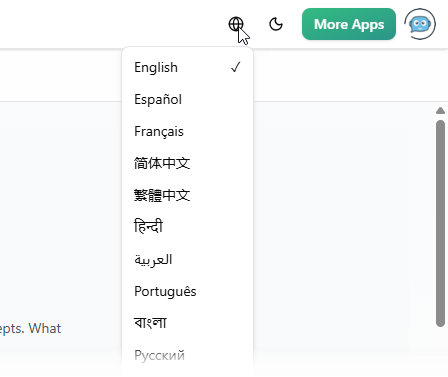
- Localized User Interface (UI): The AI Chatbot is no longer restricted to an English-only interface. Users can now toggle the UI language to match their preference. Supported languages include Español, Français, Simplified Chinese, Traditional Chinese, Português, Japanese, Deutsch, Polski, and more. This feature removes the cognitive load of navigating foreign menus, making the tool feel native to international users.
- Context-Aware Language Detection: The core AI engine has been refined to detect the language of your input prompt automatically. Previously, AI tools often defaulted to English responses even when prompted in another language (a phenomenon known as English inertia). The updated Visual Paradigm AI Chatbot ensures that if you ask for a diagram in Spanish, the labels, actors, and descriptions within the generated diagram—as well as the textual explanation—will be in Spanish.
- Broad Diagramming Standard Support: These localization features apply across the board. Whether you are working with UML diagrams (Class, Sequence, Activity), SysML for systems engineering, C4 models, or strategic tools like SWOT and PEST analyses, the language capabilities remain consistent.
Step-by-Step Tutorial: Generating a UML Diagram in Spanish
Follow these steps to experience the multi-language capabilities of the Visual Paradigm AI Chatbot. In this example, we will generate a Library Management System Use Case diagram in Spanish.
Step 1: Access the AI Chatbot
Navigate to the AI Chatbot landing page or open the AI Chatbot app. By default, the interface may appear in English.
Step 2: Switch the Interface Language
Look for the ‘Earth’ icon located on the top navigation bar. Click it to reveal a drop-down menu of available languages. Select Español (Spanish). You will notice the menus and interface elements instantly update to the selected language.
Step 3: Input Your Prompt in the Target Language

In the chat input field, type your request using your native language to ensure the AI understands the context and desired output language.
Example Prompt: “Dibuja un diagrama de casos de uso UML para un sistema de gestión de biblioteca” (Draw a UML use case diagram for a library management system).
Step 4: Review the Generated Diagram
The AI diagram generator will process your request and render a Use Case diagram. Inspect the diagram to verify that:
- Actors (e.g., ‘Bibliotecario’, ‘Usuario’) are labeled in Spanish.
- Use Cases (e.g., ‘Prestar libro’, ‘Devolver libro’) are described in Spanish.
Step 5: Ask Follow-Up Questions
One of the most powerful features is the ability to refine and analyze the diagram conversationally. Continue the session in your chosen language.
Example Follow-up: “Explica este diagrama” (Explain this diagram).
The AI will generate a textual report explaining the actors and use cases in fluent Spanish, ensuring you fully grasp the generated model.
Guidelines for Effective Multilingual Modeling
To get the best results from the AI chatbot for UML and other standards, follow these guidelines:
- Be Specific with Terminology: While the AI is good at translation, specific domain logic should be clearly stated. If a specific technical term must remain in English (e.g., specific code classes or API names), specify that in your prompt.
- Maintain Language Consistency: For the most coherent results, try to keep the entire chat session in one language. Switching back and forth between languages in a single thread can sometimes confuse the context window regarding the desired output format.
- Review Standard Compliance: Some diagramming standards (like specific SysML syntax) rely on English keywords. Ensure that the translated labels do not conflict with the strict syntax rules if you plan to generate code from these models later.
Tips and Tricks
Unlock the full potential of the Visual Paradigm AI Chatbot with these quick tips:
- Edit in Desktop: Did you know you can take your AI-generated diagram further? You can import the diagram into the Visual Paradigm desktop software for detailed editing, reporting, and code generation. The language settings will be preserved in the labels.
- Share Your Session: You can share the URL of your chat session with colleagues. This is excellent for cross-regional teams; a team member in Spain can generate the initial draft, and a colleague in Japan can view the diagram logic (visuals are universal) while using translation tools for the text.
- Strategic Analysis: Don’t limit yourself to technical diagrams. Use the tool for business strategy. Try prompting for a “SWOT analysis of an e-commerce startup” in your native language to get immediate strategic insights without the translation overhead.
- Use the ‘Explain’ Feature: If you are learning a new language or training a global team, generate a diagram in English and ask the AI to “Explain this diagram in French”. This acts as a powerful educational tool for onboarding international developers.
Resources
- AI C4 Deployment Diagram Tool | Runtime Environment Mapping – Visual Paradigm
- Flow Map Templates – Visual Paradigm Online
- Mind map for language learning | Mind Map Diagram Template – Visual Paradigm Online
- The Ultimate AI Agile Tool & User Story Mapping Software – Visual Paradigm
- Google Cloud Platform Diagram Templates – Visual Paradigm Online
- [PDF] How to Design REST API? The Twitter Example | Visual Paradigm
- Mobile Applications Infographic | Infographic Template – Visual Paradigm Online
- Visual Paradigm – AI-Powered Visual Modeling Platform
- What Is the Visual Paradigm AI Chatbot? – Visual Paradigm Guides
- How to generate C# from UML – Visual Paradigm
- How to generate Python from UML – Visual Paradigm
- Visual Paradigm AI Chatbot Enhances Multi-Language Support for Global Users
- Exporting active diagram as image – Visual Paradigm
- AI Diagram Generation Guide: Instantly Create System Models with…
- Online Sankey Diagram Maker