


Designing a robust database schema is often one of the most critical, yet time-consuming, phases of software development. It requires a delicate balance between understanding business requirements and applying technical normalization rules. Visual Paradigm DB Modeler AI enters this space as an intelligent, step-by-step tool designed to bridge the gap between abstract business logic and concrete SQL implementation. In this review, we explore how this tool leverages artificial intelligence to automate and refine the database modeling process.
What is DB Modeler AI?
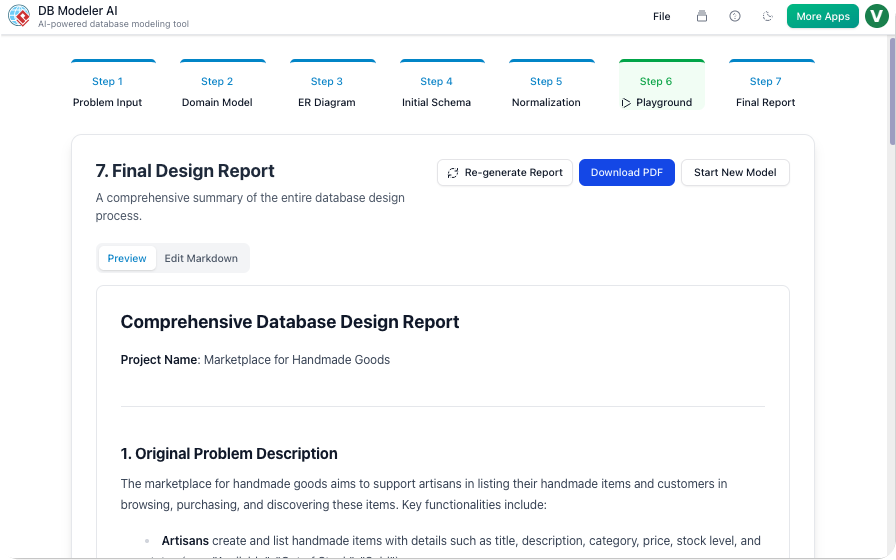
DB Modeler AI is a guided database design tool that uses artificial intelligence to transform high-level descriptions into fully normalized database schemas. Unlike traditional modeling software that relies entirely on manual drag-and-drop actions, DB Modeler AI acts as a virtual architect. It walks the user through a structured 7-step workflow, generating artifacts at every stage—from conceptual diagrams to executable SQL code.
The tool is designed to assist users in visualizing complex relationships and ensuring best practices are followed without requiring deep manual intervention. Whether you are starting with a vague project idea or a detailed requirement document, the AI assists in drafting the initial structure and refining it into a professional-grade design.
Target Audience
Who stands to benefit the most from DB Modeler AI? Based on its feature set, it serves a wide range of professionals:
- Software Developers: For quickly prototyping schemas for new applications without getting bogged down in boilerplate SQL.
- Business Analysts: To translate functional requirements into technical diagrams (like ER diagrams) that developers can actually use.
- Database Administrators (DBAs): To streamline schema creation while maintaining consistency and adherence to normalization principles.
- Students & Educators: The step-by-step nature of the tool makes it an excellent platform for learning the lifecycle of database design, from concept to normalization.
Core Features Breakdown
1. The 7-Step Guided Workflow
The standout feature of DB Modeler AI is its linear, wizard-like approach. It breaks the intimidating task of database design into manageable chunks. Users progress through specific phases: Problem Input, Domain Class Diagram, ER Diagram, Initial Schema, Normalization, Playground, and Final Report. This ensures that no critical step—such as conceptual modeling or normalization—is skipped.
2. AI-Powered Diagram Generation
Visualizing data is key to good design. The tool automatically generates Domain Class Diagrams and Entity-Relationship (ER) Diagrams based on the textual description of the project. If a user inputs a project name like “Online Bookstore,” the AI can draft a detailed problem description and subsequently create the visual models representing entities like Books, Authors, and Orders. This progressive generation saves hours of manual drawing.
3. Normalization Assistance
One of the most common pitfalls in database design is redundancy. Step 5 of the workflow is dedicated entirely to Normalization. The AI analyzes the initial schema and suggests refinements to apply normalization rules. This helps ensure data integrity and efficiency, producing a schema that is scalable and ready for production environments.
4. Interactive Schema Playground
Designing a schema is one thing; testing it is another. DB Modeler AI includes a unique Interactive Playground (Step 6). This feature allows users to experiment with the generated design by simulating table creation, data insertion, and queries. It acts as a sandbox to validate the logic of the database before a single line of code is written in the actual application.
5. Flexible Project Management
The tool supports modern collaboration needs with robust save and load options. Users can save projects to the cloud (via Supabase integration) for easy access across devices or export them as local JSON files for offline work and version control. This flexibility ensures that designs are secure and shareable.
How It Works: A Typical Workflow
Using DB Modeler AI typically follows this path:
- Problem Definition: You enter a project name and description. If you are unsure of the details, the “AI Generate Description” feature can draft a comprehensive scope for you.
- Conceptual Modeling: The AI generates a Domain Model, identifying key business entities.
- Logical Design: The tool converts the domain model into a detailed ER Diagram, defining attributes and relationships.
- Schema Generation & Refinement: An initial SQL schema is created, which is then passed through the Normalization step to optimize structure.
- Validation & Export: Finally, you test the design in the Playground and export the SQL DDL for implementation.
Pros and Cons
Pros
- Speed: drastically reduces the time from concept to SQL.
- Educational Value: The distinct steps help users understand the why and how of database design.
- Visual Clarity: Automatically generated diagrams help communicate technical structures to non-technical stakeholders.
- Cloud & Local Options: Offers flexibility in how data is stored and shared.
Cons
- Internet Dependency: AI generation features require an active internet connection.
- Optimization Limits: While the AI follows best practices, highly specialized performance tuning for massive datasets may still require manual intervention by a senior DBA.
- Scope: It is a modeling tool, not a full-fledged database management system (DBMS) or IDE.
Conclusion
DB Modeler AI represents a significant step forward in automated software engineering tools. By combining a logical, 7-step guided process with the generative capabilities of AI, it removes much of the friction associated with database design. For developers looking to prototype quickly, or analysts needing to visualize data structures, this tool offers a compelling, efficient, and educational solution. It transforms the complex, abstract task of modeling into a visual, interactive, and manageable workflow.
To learn more about the tool and try it for yourself, visit the official DB Modeler AI landing page.


