What Is a C4 Component Diagram?
The C4 model (created by Simon Brown) is a hierarchical, abstraction-focused approach to visualizing software architecture. It avoids complex notation by using simple boxes and arrows at different zoom levels:
- Level 1: System Context Diagram — high-level view of the system and its external actors/systems.
- Level 2: Container Diagram — major deployable/runnable units (applications, services, databases, etc.).
- Level 3: Component Diagram — zooms into a single container to reveal its internal structure.
- Level 4: Code Diagram — class-level details (rarely drawn).
A C4 Component Diagram specifically shows:
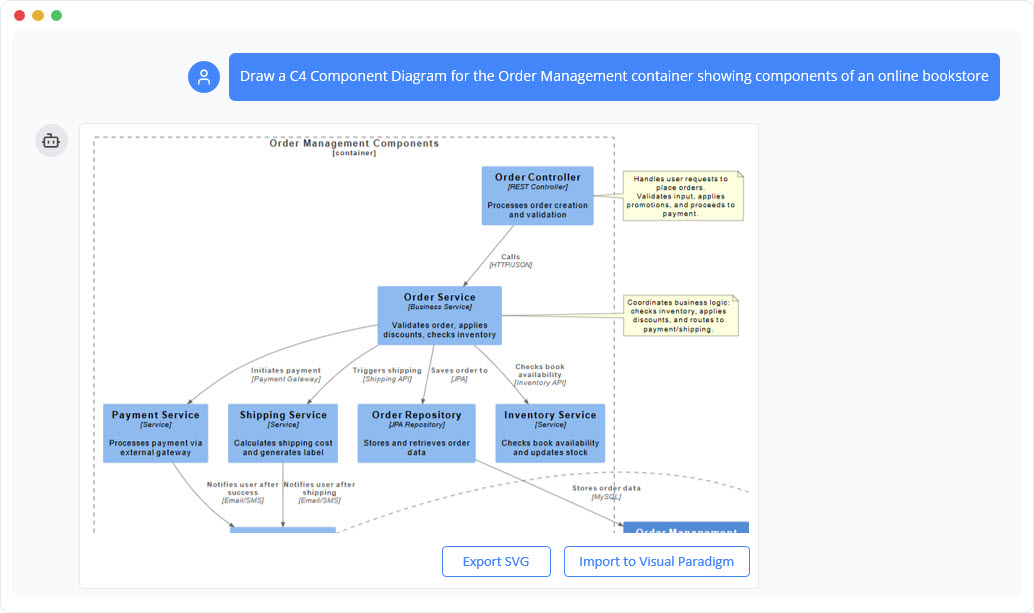
- The major structural elements (components) inside one container (e.g., a web API, mobile backend, microservice).
- Their responsibilities and functional groupings.
- How these components interact with each other.
- Dependencies on external systems or interfaces (from other containers or people).
- Technology choices and communication styles (e.g., REST, messaging) where relevant.
It focuses on conceptual modules rather than fine-grained classes/interfaces, making it ideal for architects and developers to discuss, validate, and document internal design before implementation or during refactoring.
Purpose of This Specific Page
This page educates users on generating C4 Component Diagrams (Level 3) quickly via AI, without manual drawing. Key selling points highlighted include:
- Instant generation from natural-language descriptions.
- Conversational refinement (add/remove components, change responsibilities, adjust dependencies → diagram regenerates automatically).
- Consistent application of official C4 notation.
- Fast iteration for exploring design options.
- Better team communication, documentation synchronization, and refactoring support.
How the Tool Works (User Flow)
While the landing page itself is static (explanatory content + examples), the actual functionality lives in the linked AI Chatbot interface (often at domains like ai-toolbox.visual-paradigm.com or integrated in Visual Paradigm Online/Desktop).
Typical step-by-step usage:
- Access the chatbot — Either directly via shared sessions, from Visual Paradigm Online tools menu → Chatbot, or Desktop edition (Tools → Chatbot).
- Provide an initial description — Use natural language to describe one container’s internals. Focus on:
- Functional areas/modules
- Core responsibilities of each part
- How parts interact
- External dependencies (e.g., databases, auth services, third-party APIs)
- AI generates the diagram — The chatbot interprets your text, applies C4 rules, and renders a visual Component Diagram (likely using PlantUML or similar under the hood).
- Iterate conversationally — Continue chatting:
- “Add a caching layer component”
- “Make the payment processor use async messaging”
- “Split the business logic component into services and repository”
- The AI updates and regenerates the diagram instantly.
- Refine & export — Review the result. In full Visual Paradigm environments:
- Import the diagram into a project for manual edits/layout tweaks.
- Export as PNG, PDF, SVG, etc.
- Integrate into larger C4 suites (link to Container/Context views).
- Share chat history or project.
No coding or diagramming skills are required for basic generation — just clear English descriptions.
Example Prompts from the Page
The page provides ready-to-use starting prompts (often with “[Read Chat History →]” links to demo sessions):
- “Show a C4 Component Diagram for a Logistics and Delivery Tracking System.”
- “Prepare a C4 Component Diagram for an Online Exam and Assessment System.”
- “Generate a C4 Component Diagram for an E-Commerce Platform.”
These demonstrate effective phrasing: name the system/container and request the diagram type explicitly.
Benefits Emphasized
- Builds detailed Level 3 diagrams directly from text (no blank-page problem).
- Enforces clean, consistent C4 notation automatically.
- Enables rapid design exploration and comparison of alternatives.
- Helps align teams visually during discussions or reviews.
- Keeps architecture docs up-to-date as ideas evolve.
- Supports refactoring by modeling “as-is” vs. “to-be” component structures.
Requirements & Access
- Free tier — Likely limited generation/previews available via the chat.visual-paradigm.com links.
- Full features — Requires a Visual Paradigm Online subscription or Desktop license (with active maintenance) for unlimited usage, imports, advanced editing, and integration.
- No downloads needed for cloud version; Desktop offers offline capabilities.
- The chatbot is context-aware and specialized for C4 (plus UML, ArchiMate, etc.).
Tips for Best Results
- Be specific about the container’s scope (e.g., “the backend API container” rather than the entire app).
- Mention technologies if relevant (e.g., “Spring Boot components using JPA repositories”).
- Use follow-up prompts to refine — the conversational nature is the biggest strength.
- Start broad, then zoom in — generate a Container Diagram first, then drill into one container for Component view.
- If the output isn’t quite right, describe adjustments clearly (e.g., “Remove direct DB access from UI components”).
This AI approach dramatically lowers the barrier to creating and maintaining good architectural diagrams, especially in agile/fast-moving environments. If you’re working on microservices, APIs, or monolithic refactoring, it’s a practical way to get a clean, shareable Component view in seconds rather than hours.
For hands-on trials, visit the page and follow one of the example chat links, or explore Visual Paradigm’s main C4 tools at visual-paradigm.com/solution/c4-diagram-tool.
Related Resources
- The Ultimate Guide to C4-PlantUML Studio: Revolutionizing Software Architecture Design – Visual Paradigm Blog
- Unveiling the Power of C4 Model: Simplifying Software Architecture Diagrams – Visual Paradigm Blog
- Generating Architecture Diagrams in Visual Paradigm
- C4 Diagram Tool by Visual Paradigm – Visualize Software Architecture with Ease
- Mastering State Diagrams with Visual Paradigm AI: A Guide for Automated Toll Systems
- Leveraging Visual Paradigm’s AI C4 Studio for Streamlined Architecture Documentation
- Visual Paradigm Online Supports IBM Cloud Architecture Diagrams
- Beginner’s Guide to C4 Model Diagrams – Visual Paradigm Blog